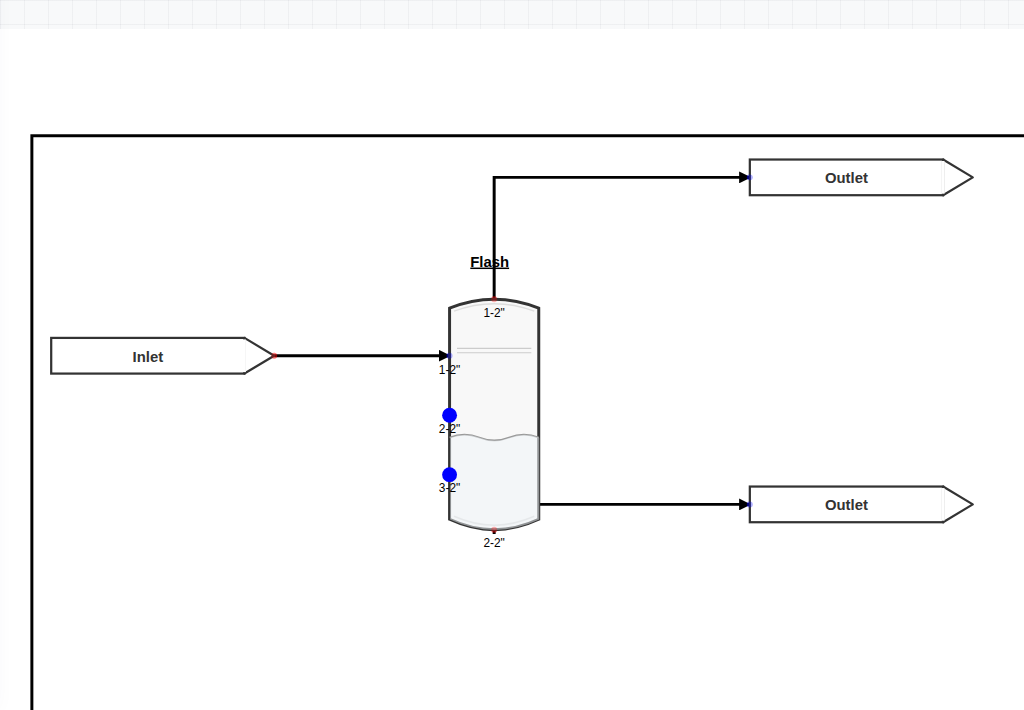
What's in the flowsheet
- A multi-component feed stream with composition, T, P, and flow rate set on the source.
- A flash drum with two operating handles: outlet temperature and outlet pressure.
- Two product streams — vapor and liquid — each with composition, flow, and enthalpy readouts.
- A property package appropriate for the feed (Peng-Robinson for light hydrocarbons; NRTL for polar mixtures).
What to try first
- Run the flowsheet and note the vapor fraction.
- Drop the flash temperature by 10 °C. The vapor fraction shrinks and the heavies condense out.
- Drop the flash pressure instead. Same direction, different physics.
- Swap the property package between Peng-Robinson and NRTL. For a mixed system, the K-values may shift dramatically.
How it works
The flash drum solves a standard isothermal flash: given feed composition, T, and P, find the vapor fraction ψ and the equilibrium phase compositions that satisfy the Rachford-Rice equation
Σᵢ zᵢ (Kᵢ − 1) / (1 + ψ (Kᵢ − 1)) = 0
K-values come from the selected property package. ChemForge handles single-phase results (subcooled liquid, superheated vapor) gracefully — the same drum simply reports zero vapor or zero liquid as appropriate.
As with every ChemForge flowsheet, the calculation runs entirely in your browser. Save as JSON, open later, share with a colleague — no upload, no account.
Related
Distillation Column
Multi-stage version of the same physics. The flash drum is the building block.
Case studyFlash Sensitivity Study
Sweep flash T or P and chart how the products move. Same drum, automated.
Open the flowsheet
Launches ChemForge with the flash drum example pre-loaded. Free, no sign-up.
Open in ChemForge